


7/10 Inch LCD Screen Protector Film for SLA/Resin 3D Printers – High-Quality Protective Film
Price range: RM5.00 through RM30.00
Order Info
- Order will be shipped out from our KL warehouse in 1-3 business days once being processed.
- If you need Lalamove once purchased, WhatsApp to our phone for quick arrange delivery.

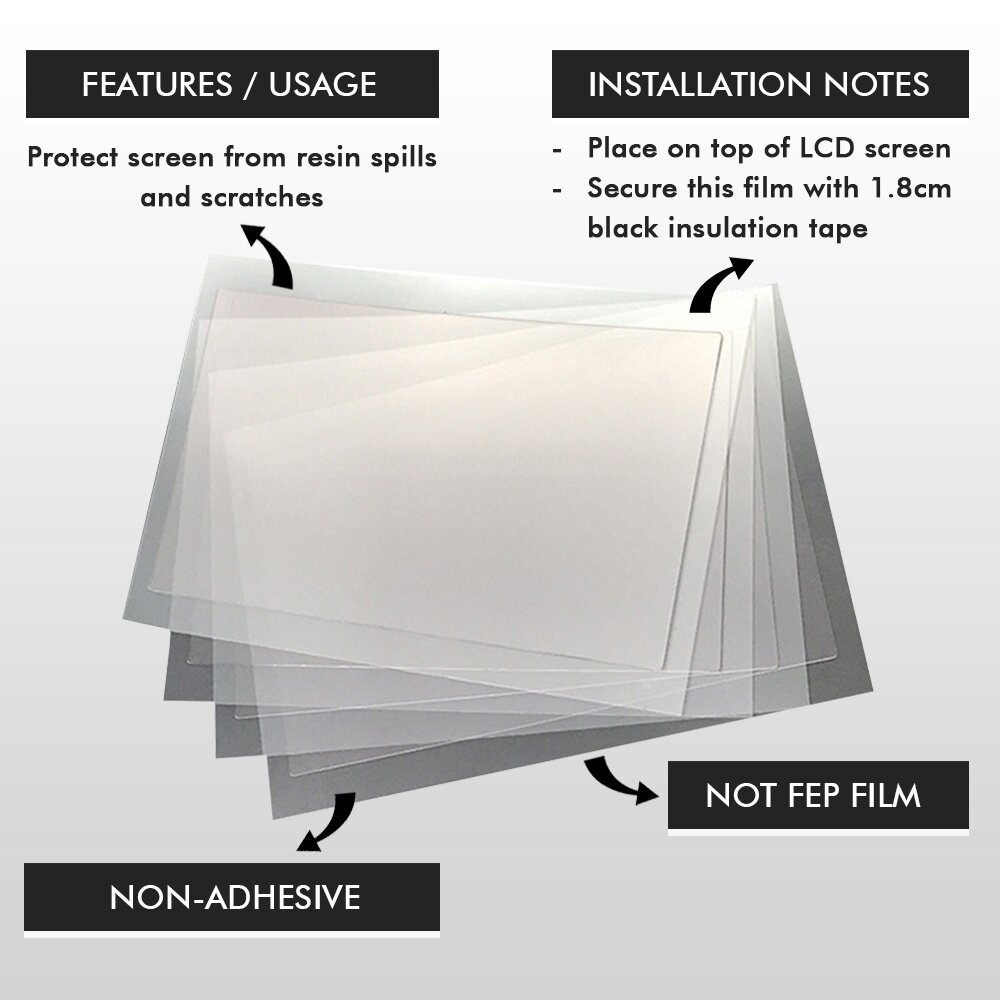
Note: This is NOT FEP Film. It is required to use black insulation tape or kaptop and it is not included in this package. Please use the 1.8cm black insulation tape to secure this LCD screen protector film.
Installation Guide (Different screen protector) : https://www.youtube.com/watch?v=hdGsdDxXLDg
Protect Your Resin Printer’s Most Expensive Part — From Just RM5
Your LCD screen costs RM400–RM900 to replace. This screen protector film costs as little as RM5 — and it catches resin spills, FEP leak damage, and scratches before they destroy your screen. One protector that saves one LCD replacement pays for itself 25–60 times over.
This is a high-transparency PET (polyethylene terephthalate) film that sits directly on your LCD screen, underneath the resin vat. It allows 93–96% UV light transmission at 405nm, so your prints stay sharp with minimal exposure adjustment. When the film gets damaged — from a resin leak, a dropped build plate, or normal wear — just peel it off and replace it. Your actual LCD stays pristine.
⚠️ This is NOT a FEP film. The screen protector goes on top of the LCD screen. FEP film goes at the bottom of the resin vat. They are completely different products.
Available Sizes
| Variant | Best For |
|---|---|
| Small (7″) | Elegoo Mars 4 / Mars 4 Ultra / Mars 5 Ultra, Anycubic Photon Mono 4 / Mono 4 Ultra, Creality Halot One Pro — and smaller printers (trim to fit) |
| Large (10″) | Elegoo Saturn 2 / 3 / 3 Ultra / 4 / 4 Ultra, Anycubic Photon Mono M5 / M5s / M7 / M7 Pro / P1, Creality Halot Mage / Mage S / Halot X1 Combo |
| X Large (13″) | Elegoo Jupiter / Jupiter SE, Anycubic Photon Mono M7 Max |
| XL Large (17″) | Extra-large format resin printers |
| Protection Tape (5m) | Black insulation tape to secure the protector film edges — recommended add-on |
Full Printer Compatibility Chart
Not all “10-inch” screens are the same size. LCD active areas differ by up to 12mm depending on resolution (8K vs 12K vs 14K vs 16K). Use this chart to pick the right size. If your printer falls between sizes, buy one size up and trim with a craft knife.
Elegoo
| Printer | LCD | Protector Size | Fit |
|---|---|---|---|
| Saturn 4 Ultra 16K | 10″ 16K | Large (10″) — trim | ⚠️ Different panel from 12K — 212×118mm |
| Saturn 4 Ultra (12K) | 10″ 12K | Large (10″) | ✅ Direct fit — 219×123mm |
| Saturn 4 | 10″ 12K | Large (10″) | ✅ Direct fit |
| Saturn 3 Ultra | 10″ 12K | Large (10″) | ✅ Direct fit (has built-in tempered glass — film is optional extra layer) |
| Saturn 3 | 10″ 12K | Large (10″) | ✅ Direct fit |
| Saturn 2 | 10″ 8K | Large (10″) | ✅ Direct fit — 219×123mm |
| Mars 5 Ultra | 7″ 9K | Small (7″) | ✅ Direct fit |
| Mars 4 Ultra | 7″ 9K | Small (7″) | ✅ Direct fit |
| Mars 4 | 7″ 9K | Small (7″) | ✅ Direct fit |
| Mars 4 DLP | DLP projector | — | ❌ Not needed (DLP, no LCD screen) |
| Mars 3 / Mars 3 Pro | 6.6″ 4K | Small (7″) — trim | ✂️ Trim from Small |
| Mars 2 / Mars 2 Pro | 6.08″ 2K | Small (7″) — trim | ✂️ Trim from Small |
| Jupiter SE / Jupiter | 12.8″ 6K | X Large (13″) | ✅ Direct fit |
Anycubic
| Printer | LCD | Protector Size | Fit |
|---|---|---|---|
| Photon P1 | 10.1″ 14K | Large (10″) — verify | ⚠️ 14K panel — 224×127mm, ~5mm wider than 12K |
| Photon Mono M7 Pro | 10.1″ 14K | Large (10″) — verify | ⚠️ Same 14K panel as P1 |
| Photon Mono M7 | 10.1″ 14K | Large (10″) — verify | ⚠️ 14K panel — check dimensions |
| Photon Mono M5s Pro | 10.1″ 14K | Large (10″) — verify | ⚠️ 14K variant — NOT same as M5s 12K |
| Photon Mono M5s | 10.1″ 12K | Large (10″) | ✅ Direct fit — same area as Elegoo Saturn 3/4 |
| Photon Mono M5 | 10.1″ 12K | Large (10″) | ✅ Direct fit |
| Photon Mono 4 Ultra | 7″ 10K | Small (7″) | ✅ Direct fit |
| Photon Mono 4 | 7″ 10K | Small (7″) | ✅ Direct fit |
| Photon Mono 2 | 6.6″ 4K+ | Small (7″) — trim | ✂️ Ships with factory protector — use this as replacement |
| Photon Mono X 6Ks | 9.1″ 6K | Large (10″) — trim | ✂️ Trim from Large |
| Photon Mono X2 | 9.1″ 4K+ | Large (10″) — trim | ✂️ Trim from Large |
| Photon Mono X | 8.9″ 4K | Large (10″) — trim | ✂️ Trim from Large |
| Photon Mono 4K | 6.23″ 4K | Small (7″) — trim | ✂️ Trim from Small |
| Photon Mono / Mono SE | 6.08″ 2K | Small (7″) — trim | ✂️ Trim from Small |
| Photon Mono M7 Max | 13.6″ 7K | X Large (13″) — verify | ⚠️ May need custom trim |
| Photon Ultra / Photon D2 | DLP projector | — | ❌ Not needed (DLP, no LCD screen) |
Creality
| Printer | LCD | Protector Size | Fit |
|---|---|---|---|
| Halot X1 Combo 16K | 10.1″ 16K | Large (10″) — trim | ⚠️ 16K panel — 212×118mm |
| Halot Mage S | 10.1″ 14K | Large (10″) — verify | ⚠️ 14K panel — different from Halot Mage |
| Halot Mage / Mage Pro | 10.3″ 8K | Large (10″) — tight | ⚠️ Slightly larger than standard 10″ (228×128mm) |
| Halot Ray | 9.25″ 6K | Large (10″) — trim | ✂️ Trim from Large |
| Halot Sky (2022) | 9.25″ 6K | Large (10″) — trim | ✂️ Same panel as Halot Ray |
| Halot Sky (original) | 8.9″ 4K | Large (10″) — trim | ✂️ Trim from Large |
| Halot Lite | 8.9″ 4K | Large (10″) — trim | ✂️ Trim from Large |
| LD-006 | 8.9″ 4K | Large (10″) — trim | ✂️ Trim from Large |
| Halot One Plus | 7.9″ 4K | Large (10″) — trim | ✂️ Non-standard size — trim from Large |
| Halot One Pro | 7.04″ 3K | Small (7″) — trim | ✂️ Near-square aspect ratio — measure first |
| Halot One / LD-002H | 5.96″ 2K | Small (7″) — trim | ✂️ Trim from Small |
⚠️ Important: “10-inch” Is NOT One Size Fits All
Within the 10-inch category, there are four distinct LCD active areas depending on resolution. A protector that fits a 12K screen may not fit a 14K or 16K screen:
| Resolution | Active Area | Example Printers |
|---|---|---|
| 8K | 228 × 128mm | Creality Halot Mage / Mage Pro |
| 12K | 219 × 123mm | Elegoo Saturn 2/3/4, Anycubic M5/M5s |
| 14K | 224 × 127mm | Anycubic M7/M7 Pro/P1, Creality Halot Mage S |
| 16K | 212 × 118mm | Elegoo Saturn 4 Ultra 16K, Creality Halot X1 |
When in doubt, buy the next size up and trim to fit with a sharp craft knife and ruler.
Why You Need a Screen Protector
There are three things that kill resin printer LCD screens:
1. Resin spills (the #1 killer). When your FEP film tears or develops a pinhole, liquid resin leaks directly onto the LCD. The UV LEDs then cure that resin onto the screen — permanent, irreversible damage. With a protector installed, you simply peel it off, wipe the LCD clean, and apply a fresh film. Without one, you’re shopping for a RM400–RM900 replacement screen.
2. Physical scratches. FEP changes, dropped build plates, cleaning with the wrong tools — all leave scratches that diffract UV light and cause print artifacts. The protector takes the abuse instead of your screen.
3. UV degradation (unavoidable). Mono LCDs last ~2,000 hours before UV exposure degrades the polariser. A protector can’t prevent this, but by blocking the other two threats, it ensures your screen reaches its full lifespan instead of dying prematurely from a preventable accident.
Specifications
| Feature | Detail |
|---|---|
| Material | PET (Polyethylene Terephthalate) |
| Thickness | 0.10 – 0.13mm |
| UV Transparency | 93–96% at 405nm |
| Available Sizes | 7″ (Small), 10″ (Large), 13″ (X Large), 17″ (XL Large) |
| Installation | Lay flat on LCD, secure edges with insulation tape |
| Typical Lifespan | 6–12 months (replace immediately after any resin spill) |
| Impact on Prints | Minimal — may need 5–10% longer exposure time |
How to Install
- Power off and remove the resin vat.
- Clean the LCD with isopropyl alcohol (IPA) and a microfiber cloth. Let it dry completely.
- Remove dust with a sticky pad — even tiny particles cause bubbles.
- Peel the backing and align from one edge. Lower slowly — don’t drop flat.
- Squeegee out bubbles from centre to edges with a soft card.
- Remove the front protective layer (if your protector has film on both sides).
- Tape all edges with black insulation tape or kapton tape to prevent resin seepage underneath.
- Re-level your build plate — the added 0.1mm thickness changes your Z-offset. This step is critical.
- Test print and increase exposure by 5–10% if needed.
📺 Video guide: Watch installation tutorial on YouTube
Common Mistakes
- Not re-levelling after installation — the extra thickness throws off your Z-offset. First layer won’t stick until you re-level.
- Installing over a wet or dirty screen — trapped moisture or dust creates permanent bubbles.
- Not taping the edges — resin can seep underneath during a spill, defeating the purpose.
- Ordering wrong size for “10-inch” printers — 12K, 14K, and 16K panels have different active areas. Check the chart above.
- Forgetting both peel layers — some protectors have protective film on both sides. Leaving one on reduces UV transmission.
- Using a phone screen protector — generic films block too much 405nm UV light. Use a PET film designed for resin printers.
Package Includes
- 1× LCD Screen Protector Film (selected size)
Note: Black insulation tape is not included with the film variants. Add the Protection Tape (5m) variant to your order, or use your own kapton / insulation tape.
LCD Screen Protector Film for Resin SLA/DLP 3D Printer
To protect your LCD Screen from resin spills or even accidental scratches.
Available Sizes:
SMALL (7 inches)
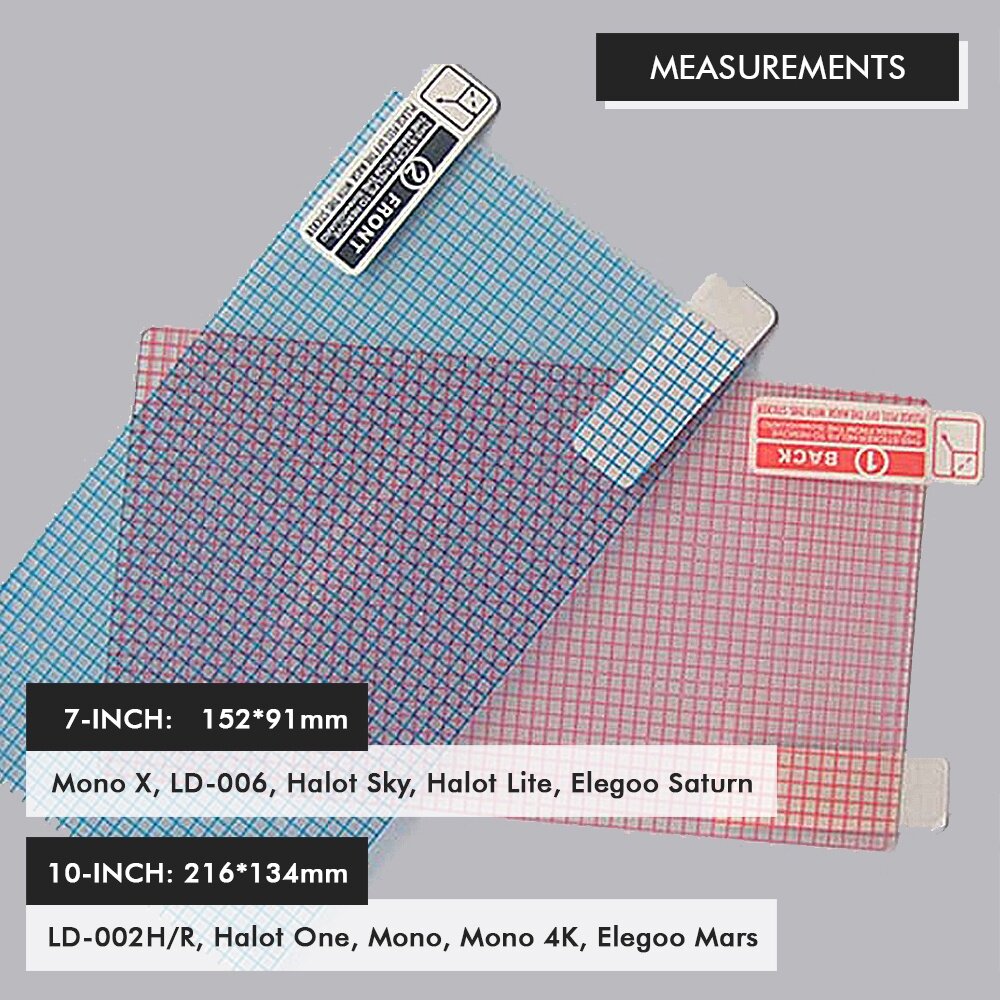
Suitable for all small size resin 3D Printer i.e Halot One, Anycubic Photon / Photon S /Mono SE/ Mono 4K, Voxelab Proxima, Creality LD-002H/ LD-002R, Elegoo Mars 2 Pro, Elegoo Mars, Elegoo Mars Pro
LARGE (10 inches)
Suitable for large size resin 3D Printer i.e Anycubic Mono X, Elegoo Saturn, Creality LD-006, Halot Lite, Halot Sky
Package Includes:
1pc x LCD Screen Protector Film for MSLA 3D Printer
.
| Weight | 1.00 kg |
|---|---|
| Dimensions | 16.00 × 16.00 × 1.00 cm |
| Size | Small (7 inches), Large (10 inches), X Large (13 inches), XL Large (17inches), Protection Tape (5m) |
Only logged in customers who have purchased this product may leave a review.
Related products


Extruder

Extruder
Creality CR10S Pro / CR10 Max Replacement Nozzle, High-Quality 3D Printer Nozzle Spare Part


Hotend
Silicone Sock Cover for E3D V6 Heat Block – 3D Printer Accessory for Improved Temperature Control

3 reviews for 7/10 Inch LCD Screen Protector Film for SLA/Resin 3D Printers – High-Quality Protective Film
There are no reviews yet.