
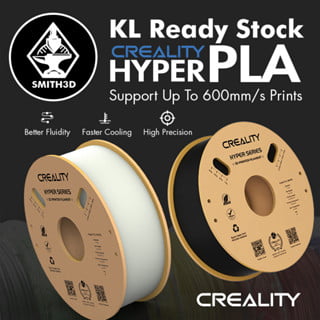
Creality Hyper Series PLA Filament 1kg 1.75mm
RM59.00
| Key Specifications | |
|---|---|
| Nozzle Temperature | 190–230 ºC |
| Bed Temperature | 25–60 ºC |
| Printing Speed | 40–600 mm/s |
| Chamber Temperature | 0–50 ºC |
| Density | 1.24 g/cm³ |
| Tensile Strength | 52.99 MPa |
| Elongation at Break | 6.3 % |
| Flexural Strength | 92.38 MPa |
| Flexural Modulus | 2 490 MPa |
| Impact Strength | 8.83 kJ/m² |
Order Info
- Order will be shipped out from our KL warehouse in 1-3 business days once being processed.
- If you need Lalamove once purchased, WhatsApp to our phone for quick arrange delivery.

Creality Hyper Series PLA Filament 1.75mm 1KG – High-Speed PLA for Fast 3D Printing
Creality Hyper PLA is a high-speed PLA filament engineered for fast 3D printing at speeds up to 600mm/s. This fast printing filament is specially formulated for Creality’s high-speed printers like the K1 and K1 Max, delivering 10x faster printing without sacrificing quality.
With higher toughness than standard PLA and excellent layer adhesion at high speeds, Creality Hyper PLA is perfect for rapid prototyping, production prints, and anyone looking to maximize their print speed.
Creality Hyper PLA Key Features
- 10x Faster Printing – Optimized for speeds up to 600mm/s
- Higher Toughness – Improved impact resistance vs standard PLA
- Stable Extrusion – Uniform diameter for consistent feeding
- Strong Layer Adhesion – Maintains strength at high speeds
- Neat Winding – Tangle-free spool design
- Eco-Friendly – Reduced packaging, lower carbon footprint
Creality Hyper PLA Printing Parameters
| Parameter | Recommended Range | Notes |
|---|---|---|
| Nozzle Temperature | 190-230°C | Start at 210°C |
| Bed Temperature | 25-60°C | Or room temp with adhesive |
| Print Speed | 30-600mm/s | High-speed capable |
| Cooling Fan | 100% | Full cooling recommended |
| Bed Surface | PEI, Carbon Silicon, Textured | PVP glue stick optional |
Creality Hyper PLA Material Properties
| Property | Value |
|---|---|
| Density | 1.25 g/cm³ |
| Tensile Strength (XY) | 52.99 MPa |
| Tensile Modulus (XY) | 1146 MPa |
| Elongation at Break | 6.3% |
| Flexural Strength (XY) | 92.38 MPa |
| Flexural Modulus (XY) | 2490 MPa |
| Charpy Impact Strength | 8.83 kJ/m² |
Test conditions per Creality TDS. XY = horizontal print orientation.
Hyper PLA vs Standard PLA Comparison
| Feature | Hyper PLA | Standard PLA |
|---|---|---|
| Max Print Speed | 600mm/s | 60-100mm/s |
| Toughness | Higher | Standard |
| Layer Adhesion at Speed | Excellent | May delaminate |
| Best For | High-speed printers | Standard printers |
Hyper PLA Filament Applications
- Rapid Prototyping – Quickly iterate designs with fast print times
- Production Printing – High-volume parts with consistent quality
- Figurines & Models – Detailed prints at high speeds
- Machine Parts – Functional prototypes with good strength
- Mass Production – Efficient batch printing
Hyper PLA Printing Tips
- Use Compatible Printer – Best with K1, K1 Max, X1C or printers with input shaping.
- Calibrate Flow – Start at 95% flow; adjust as needed.
- Enable Input Shaping – Required for quality at high speeds.
- Good Cooling – Adequate part cooling essential at high speeds.
- PEI Bed – Provides excellent adhesion for fast first layers.
Creality Hyper PLA Specifications
| Brand | Creality |
| Product Line | Hyper Series |
| Material | PLA (Polylactic Acid) – High Speed |
| Diameter | 1.75mm (Tolerance: ±0.03mm) |
| Net Weight | 1kg per spool |
| Packaging | Vacuum-sealed bag with desiccant |
Creality Hyper PLA FAQ
Q: Can I use Hyper PLA on a standard printer?
A: Yes, Hyper PLA works on standard printers at normal speeds. However, you won’t see the full speed benefits without a high-speed capable printer with proper motion systems.
Q: What printer is best for Hyper PLA?
A: Creality K1, K1 Max, K1C, Bambu Lab X1C/P1S, and other printers with CoreXY kinematics and input shaping provide the best high-speed results.
Q: Is Hyper PLA stronger than regular PLA?
A: Hyper PLA has higher toughness and better layer adhesion than standard PLA, especially at high print speeds where regular PLA would delaminate.
Q: Does Hyper PLA need an enclosure?
A: No, like standard PLA, Hyper PLA does not require an enclosure and prints well in open air.
Related Products
Looking for other 3D printing materials? Explore our collections:
- PLA Filament – Standard PLA options
- Hyper PLA Colors – All Hyper PLA options
- All Creality Products – Printers and accessories
| Weight | N/A |
|---|---|
| Dimensions | N/A |
| Colour | Hyper PLA White, Hyper PLA Black, Hyper PLA Blue, Hyper PLA Red, Hyoer PLA Gold, Hyper PLA Yellow, Hyper PLA Green, Hyper PLA Very Peri |
Only logged in customers who have purchased this product may leave a review.
Related products


ABS Filament / ABS+ Filament

Materials

Materials

Glossy / SILK


Materials
Reviews
There are no reviews yet.