


Bambu Lab Support for PLA / PETG / ABS
Price range: RM59.00 through RM349.00
| Key Specifications | |
|---|---|
| Printing Temperature | 190–240 ºC |
| Bed Temperature | 35–60 ºC |
| Printing Speed | < 100 mm/s |
| Chamber Temperature | 25–45 ºC |
| Density | 1.28 g/cm³ |
Order Info
- Order will be shipped out from our KL warehouse in 1-3 business days once being processed.
- If you need Lalamove once purchased, WhatsApp to our phone for quick arrange delivery.

Bambu Lab Support Filament for PLA/PETG/ABS – Easy Peel-Off Breakaway Support Material
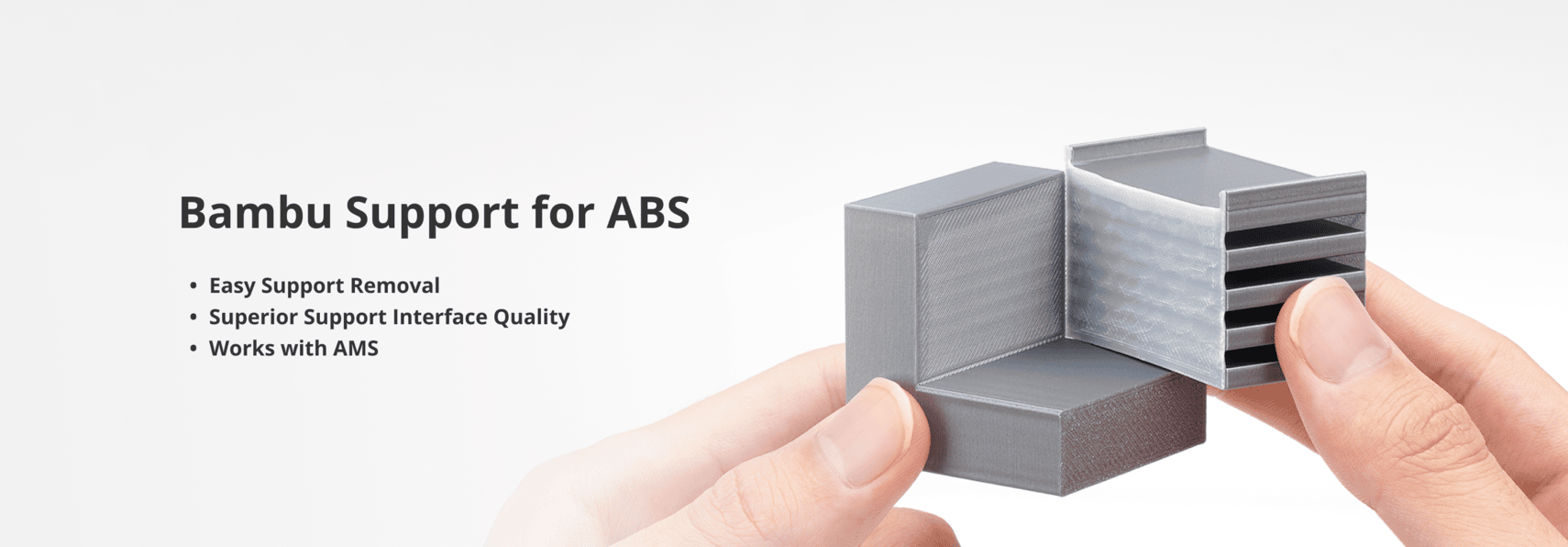
Bambu Lab Support Filament is a specialized breakaway support material designed for effortless, tool-free removal from PLA, PETG, and ABS prints. The specially formulated material minimizes fusion with your main filaments, allowing supports to cleanly separate without damaging surface quality. At 34% less cost than previous versions, it delivers premium results at an affordable price.
Perfect for complex prints with overhangs, bridges, and intricate details. RFID-enabled for automatic settings and fully compatible with AMS and AMS Lite systems.
Bambu Lab Support Filament Key Features
- Effortless Peel-Off – Remove by hand without tools
- Residue-Free Separation – Clean break from prints
- 34% Lower Cost – More affordable than previous version
- Multi-Material Compatible – Works with PLA, PETG, and ABS
- RFID & AMS Compatible – Works with AMS and AMS Lite
- Interface-Only Option – Use only where needed
Bambu Lab Support Filament Printing Parameters
| Parameter | Recommended Value | Notes |
|---|---|---|
| Nozzle Temperature | 230°C | Both initial and other layers |
| Bed Temperature | 60°C | For all plate types |
| Drying | 75°C for 8 hours | If brittle or moisture exposed |
| Slicer Setting | Support/Raft Interface | Select in Bambu Studio |
| Top Interface | 0mm | For best results |
| Z-Distance | 0mm | For best results |
Slicer Configuration (Bambu Studio)
| Setting | Configuration |
|---|---|
| Support/Raft Interface | Select “Support for PLA/PETG” or “Support for ABS” |
| Interface-Only Mode | Enable for efficient material usage |
| Tree Supports | Avoid using support filament for “Support/raft base” |
Support Filament Applications
- Complex Overhangs – Support steep angles cleanly
- Bridges – Prevent sagging on long spans
- Intricate Details – Preserve fine features
- Multi-Material Prints – AMS-enabled dual extrusion
- Batch Production – Consistent quality across prints
- Professional Prototypes – Clean surfaces without post-processing
Support Filament Tips
- Interface-Only Mode – Enable for efficient material usage.
- 0mm Settings – Use 0mm top interface and Z-distance for best separation.
- Avoid Tree Support Base – Don’t use for “Support/raft base” with tree supports.
- Store Dry – Keep sealed; dry at 75°C for 8 hours if brittle.
- RFID Auto-Settings – AMS automatically configures optimal parameters.
Bambu Lab Support Filament Specifications
| Brand | Bambu Lab |
| Material | Breakaway Support Material |
| Diameter | 1.75mm |
| Compatible With | PLA, PETG, ABS |
| RFID Enabled | Yes (AMS & AMS Lite compatible) |
| Removal Method | Hand peel-off (no tools needed) |
| Cost Savings | 34% less than previous version |
Bambu Lab Support Filament FAQ
Q: How does the support separate so easily?
A: The support filament is formulated to minimize fusion with PLA and PETG due to differences in polarity, allowing clean separation without damaging the print surface.
Q: Do I need to use support filament for the entire support structure?
A: No! Enable “Interface-Only Mode” in Bambu Studio to use support filament only on contact surfaces, saving material and time.
Q: Is this compatible with AMS Lite?
A: Yes, the Support Filament works with both AMS and AMS Lite systems with RFID auto-detection.
Q: What if the support is hard to remove?
A: Check your slicer settings – use 0mm top interface and 0mm Z-distance. Also ensure the filament is dry; wet filament can bond more strongly.
Q: Can I use this with third-party filaments?
A: While optimized for Bambu Lab filaments, it can work with other PLA, PETG, and ABS. Results may vary with non-Bambu materials.
Related Products
Looking for other support materials or multi-material solutions? Explore our collections:
- PVA Support Filament – Water-soluble support
- All Support Materials – More options
- Bambu Lab PLA – Compatible main materials
- AMS-Compatible Filaments – Multi-material printing
| Weight | 0.80 kg |
|---|---|
| Dimensions | 25.00 × 25.00 × 7.00 cm |
| Variation | Support for PLA, Support for PLA/PETG, Support for ABS |
| Size | 0.5kg, 1kg |
Only logged in customers who have purchased this product may leave a review.
Related products

Materials


Materials

ABS Filament / ABS+ Filament
Smith3D ABS Filament 1.75mm 1kg – High-Quality ABS+ 3D Printer Filament


Materials

Materials


Reviews
There are no reviews yet.